

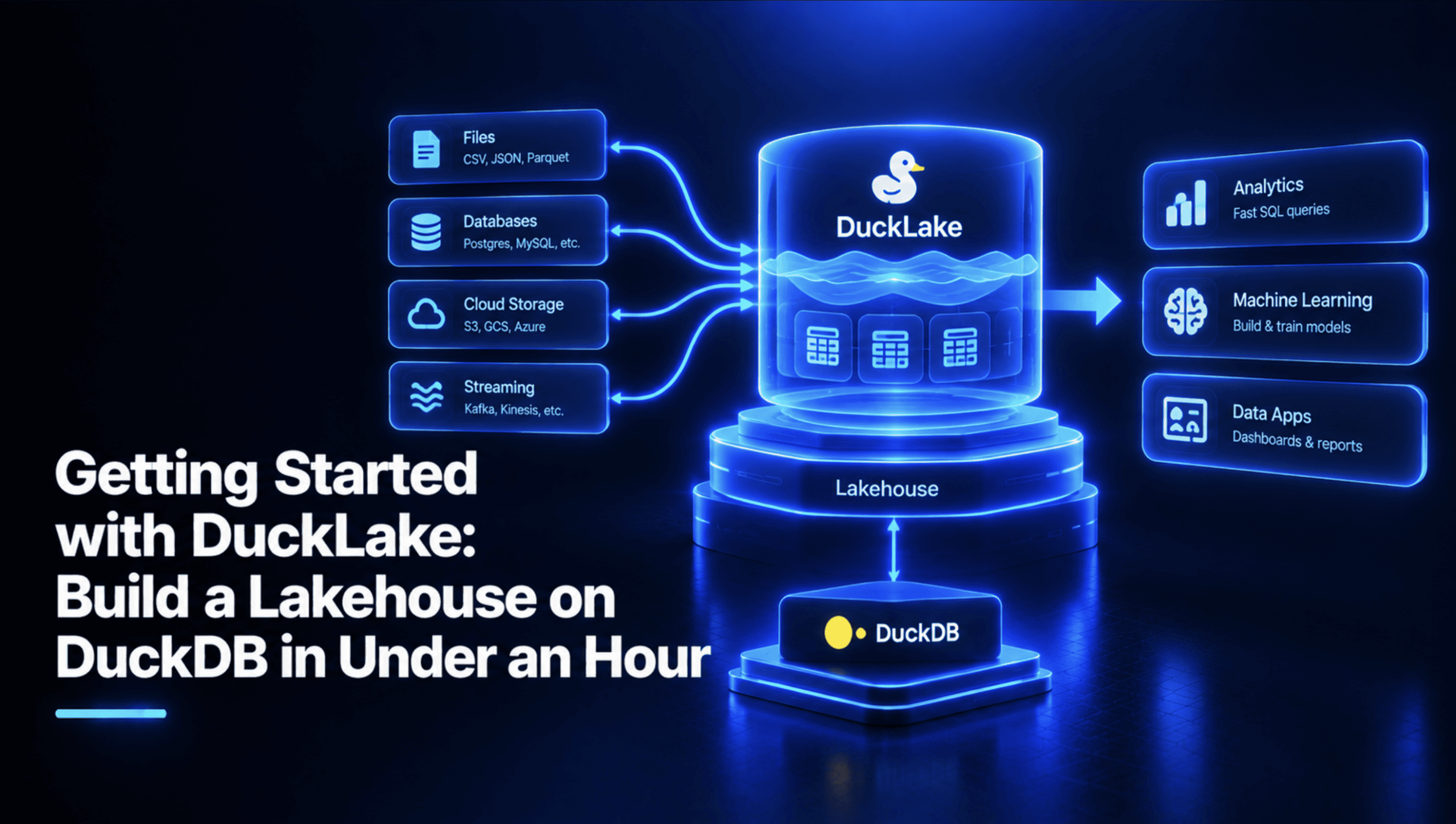
DuckLake is an open lakehouse table format from the DuckDB team. It keeps table metadata in a SQL database and the data in Parquet files. DuckLake 1.0 shipped in April 2026 with a stable specification and guaranteed backward compatibility. This article builds a working DuckLake lakehouse on your laptop with Python and the duckdb package: you will load Parquet data, change rows and schema, time travel, and run maintenance.
How DuckLake Works
A DuckLake has two parts. The data lives in Parquet files in a folder or object store. Everything else, meaning the table list, schemas, snapshots, and file statistics, lives in a catalog database. DuckLake can use any SQL database as its catalog, as long as it supports ACID transactions and primary key constraints. Formats like Apache Iceberg and Delta Lake track much of this in metadata files. In DuckLake, finding the right files is one SQL query.
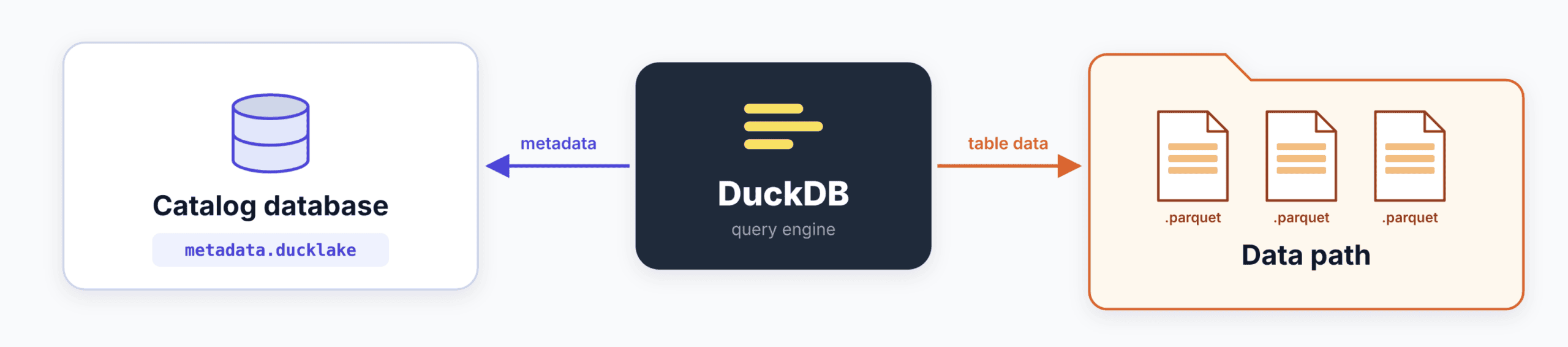
The docs suggest a catalog by use case: DuckDB for a single client, SQLite for several local clients, and PostgreSQL for a multi-user lakehouse. We use DuckDB, the simplest option. Like other lakehouse formats, DuckLake does not support indexes, primary keys, foreign keys, or UNIQUE and CHECK constraints.
Prerequisites
DuckLake 1.0 is supported by DuckDB v1.5.2 or newer. You need a recent Python 3 and an internet connection the first time, because DuckDB downloads the ducklake extension on first use.
pip install "duckdb>=1.5.2"
python -c "import duckdb; print(duckdb.__version__)"
The first command installs DuckDB’s Python package at the minimum version DuckLake 1.0 needs. The second prints the installed version, which should be 1.5.2 or higher. Create an empty project folder and put the six scripts below in it: step1_make_data.py, common.py, step2_load.py, step3_change.py, step4_time_travel.py, and step5_maintenance.py. Run them in order from that folder.
Step 1: Creating Sample Parquet Data
A lakehouse needs data to hold. This script uses DuckDB itself to write two months of fake orders as plain Parquet files.
# step1_make_data.py
import os

import duckdb

os.makedirs("raw", exist_ok=True)
con = duckdb.connect()

# Two months of fake orders, 5,000 rows each, written as plain Parquet files.
for month, first_day, first_id in [("2026_01", "2026-01-01", 0), ("2026_02", "2026-02-01", 5000)]:
    con.execute(f"""
        COPY (
            SELECT
                {first_id} + i AS order_id,
                DATE '{first_day}' + CAST(i % 28 AS INTEGER) AS order_date,
                ['north', 'south', 'east', 'west'][1 + i % 4] AS region,
                ['pending', 'shipped', 'delivered'][1 + i % 3] AS status,
                CAST(10 + (i * 37 % 900) / 10.0 AS DECIMAL(10, 2)) AS amount
            FROM range(5000) AS t(i)
        ) TO 'raw/orders_{month}.parquet' (FORMAT parquet)
    """)

con.sql("SELECT count(*) AS rows, min(order_date), max(order_date) FROM 'raw/orders_*.parquet'").show()
For each month, the loop runs one COPY ... TO statement that writes a Parquet file. range(5000) produces 5,000 numbers, and each one becomes a row. The order ID counts up from a starting value, the date cycles through 28 days, and the region and status cycle through fixed lists, so the data is repeatable. The amount is cast to DECIMAL(10, 2), which suits money. The last line reads both files back and prints the row count and date range, which should be 10,000 rows from January 1 to February 28.
Step 2: Creating the Lake and Loading January
Every later script starts the same way, so the shared setup goes in one helper file.
# common.py
import json
import os

import duckdb

MARKERS = "lake/markers.json"


def connect():
    """Open a DuckDB session with the DuckLake attached and selected."""
    os.makedirs("lake/data", exist_ok=True)       # the folder for the catalog file must already exist
    con = duckdb.connect()
    con.execute("INSTALL ducklake")
    con.execute("LOAD ducklake")
    if os.path.exists("lake/metadata.ducklake"):
        con.execute("ATTACH 'ducklake:lake/metadata.ducklake' AS lake")   # data path is stored in the catalog
    else:
        con.execute("ATTACH 'ducklake:lake/metadata.ducklake' AS lake (DATA_PATH 'lake/data/')")
    con.execute("USE lake")
    return con


def mark(con, name):
    """Remember the newest snapshot ID under a name, so later steps can travel back to it."""
    snapshot_id = con.execute("SELECT max(snapshot_id) FROM lake.snapshots()").fetchone()[0]
    markers = markers_so_far()
    markers[name] = snapshot_id
    with open(MARKERS, "w") as f:
        json.dump(markers, f)
    return snapshot_id


def markers_so_far():
    if os.path.exists(MARKERS):
        with open(MARKERS) as f:
            return json.load(f)
    return {}
connect() loads the extension and attaches the lake. The path in ATTACH 'ducklake:...' is the catalog database, and DATA_PATH is where the Parquet files go. The docs note that the catalog’s folder must already exist, so the code creates it first. The data path is stored in the catalog, so later sessions skip DATA_PATH. USE lake means plain table names point at the lake instead of DuckDB’s temporary in-memory database, a mistake the docs warn about. mark() saves the newest snapshot ID under a name in a small JSON file. Snapshot numbers depend on exactly what ran before, so naming them lets the time travel step avoid hard-coding any IDs.
Now load January:
# step2_load.py
from common import connect, mark

con = connect()

# Create the table straight from the January Parquet file.
con.execute("CREATE TABLE orders AS SELECT * FROM read_parquet('raw/orders_2026_01.parquet')")
mark(con, "loaded")

con.sql("SELECT count(*) AS rows, min(order_date) AS first_day, max(order_date) AS last_day FROM orders").show()
con.sql("FROM lake.snapshots()").show()
con.sql("FROM glob('lake/data/**/*')").show()
CREATE TABLE ... AS reads the Parquet file and writes the result into the lake. Then we mark that snapshot as loaded. The three queries show what DuckLake recorded. The first confirms the data (5,000 rows), the second lists snapshots, and the third lists the files under the data path. snapshots() returns one row per snapshot with an ID, a time, a schema version, and a summary of what changed. This is the metadata other formats keep in files, and here it is a table you can query.
python step1_make_data.py
python step2_load.py
Run step 1 once to create the files, then step 2 to build the lake. You should now have a lake/ folder containing metadata.ducklake and a data/ folder with Parquet files.
Step 3: Changing the Data and the Schema
Each change below creates a new snapshot.
# step3_change.py
from common import connect, mark

con = connect()

# 1. Append February.
con.execute("INSERT INTO orders SELECT * FROM read_parquet('raw/orders_2026_02.parquet')")
mark(con, "appended")

# 2. Update many rows: early-January shipped orders are now delivered.
con.execute("UPDATE orders SET status = 'delivered' WHERE status = 'shipped' AND order_date  DATE '2026-01-15'")
mark(con, "updated")

# 3. Change the schema: new column, renamed column.
con.execute("ALTER TABLE orders ADD COLUMN channel VARCHAR")
con.execute("ALTER TABLE orders RENAME COLUMN amount TO total")
mark(con, "evolved")

con.sql("SELECT snapshot_id, snapshot_time, changes FROM lake.snapshots() ORDER BY snapshot_id").show()
con.sql("SELECT * FROM orders LIMIT 3").show()
First, INSERT appends February’s 5,000 rows. Second, UPDATE touches several hundred rows, and the docs describe updates in DuckLake as deletes followed by inserts, so the old rows are masked by a delete file and the new versions are written as new data. Third, the two ALTER TABLE statements add a channel column and rename amount to total. Schema changes are metadata operations: the existing Parquet files are not rewritten, and the catalog maps old files to the new table shape. We mark each stage, then print the snapshot list. Run it with python step3_change.py. You should see one new snapshot for each statement, and the old rows show NULL in channel.
Step 4: Time Traveling and Undoing Changes
Because every change is a snapshot, any table can be queried as it was.
# step4_time_travel.py
from common import connect, mark, markers_so_far

con = connect()
m = markers_so_far()

# Row counts at three points in history.
for name in ["loaded", "appended", "evolved"]:
    n = con.execute(f"SELECT count(*) FROM orders AT (VERSION => {m[name]})").fetchone()[0]
    print(f"{name:9} (snapshot {m[name]}): {n} rows")

# The schema is versioned too: the old snapshot still has the column called amount.
con.sql(f"SELECT * FROM orders AT (VERSION => {m['loaded']}) LIMIT 3").show()

# Make a mistake, then undo it from history.
con.execute("DELETE FROM orders WHERE region = 'west'")
mark(con, "mistake")
print("after the mistake:", con.execute("SELECT count(*) FROM orders").fetchone()[0], "rows")

con.execute(f"""
    INSERT INTO orders (order_id, order_date, region, status, total)
    SELECT order_id, order_date, region, status, total
    FROM orders AT (VERSION => {m['evolved']})
    WHERE region = 'west'
""")
print("after the restore:", con.execute("SELECT count(*) FROM orders").fetchone()[0], "rows")
The AT (VERSION => n) clause is DuckLake’s time travel syntax. The loop counts rows at three marked points. You should see 5,000 after loaded, 10,000 after appended, and 10,000 after evolved. The next query reads the first snapshot and returns the old column name, amount, because time travel returns the schema as it was.
Then we simulate a mistake: DELETE removes every west-region order. To undo it, we insert those rows back from the evolved snapshot, which still has them. The restore names its columns, since the table now has the extra channel column, and reads total, the column’s name at that snapshot. The final count should return to 10,000. You can also travel by time instead of ID, for example AT (TIMESTAMP => now() - INTERVAL 10 MINUTE).
Step 5: Maintenance
Every write leaves files behind, so a lake needs housekeeping.
# step5_maintenance.py
from common import connect

con = connect()

# Every write made new files. Merge small adjacent files into larger ones.
con.sql("SELECT * FROM ducklake_merge_adjacent_files('lake')").show()
con.sql("FROM glob('lake/data/**/*')").show()
ducklake_merge_adjacent_files merges small neighboring files into larger ones, returning a row for each file it creates, and the docs note it only merges files that share a schema version. The second query lists the data folder again so you can compare. Run it with python step5_maintenance.py.
Three more points matter in practice. First, DuckLake never deletes old data files, because time travel needs them. To reclaim space, you must expire snapshots and then clean up files, and the docs recommend the CHECKPOINT statement to run all of this periodically. Expiring a snapshot ends your ability to travel back to it, so set the retention deliberately before scheduling it. Second, data inlining is on by default with a limit of 10 rows: tiny writes go into the catalog instead of a new Parquet file, and ducklake_flush_inlined_data moves them out later. That is why our 5,000-row inserts produced files, while a three-row insert would not. Third, the DuckDB-file catalog allows only a single client. For several users, create the lake on PostgreSQL instead:
ATTACH 'ducklake:postgres:dbname=ducklake_catalog host=localhost' AS lake (DATA_PATH 'lake/data/');This is the same ATTACH with a PostgreSQL catalog, taken from the connection docs and catalog guide. The database must exist, and you need to install the postgres extension first. Every other statement in this tutorial stays the same.
Conclusion
DuckLake’s roadmap points further ahead. The 1.0 announcement lists git-like branching and incremental materialized views as possible directions for DuckLake v2.0, and DuckDB Labs joined AWS on August 26 while saying it stays focused on DuckDB, DuckLake, and Quack. With DuckDB 2.0 close, the single-laptop lakehouse is about to get faster on remote storage, with a client-server option for sharing it.
To recap: DuckLake keeps metadata in a SQL catalog and data in Parquet, so a lakehouse needs only DuckDB and a folder. You created one, loaded Parquet, appended, updated, and changed the schema, queried past versions with AT (VERSION => n), undid a mistake from history, and merged small files. Remember that old files stay until you expire snapshots, that tiny writes are inlined by default, and that the DuckDB-file catalog serves one client. Switch to PostgreSQL when you need more, and watch the 2.0 release notes before you upgrade.
Shittu Olumide is a software engineer and technical writer passionate about leveraging cutting-edge technologies to craft compelling narratives, with a keen eye for detail and a knack for simplifying complex concepts. You can also find Shittu on Twitter.
Soyez le premier à commenter