

We finally have a serious American competitor to Qwen3.8-27B, one of the best AI models you can run locally. Thinking Machines Lab has released Inkling 2 Mini, a powerful open-weight model that matches Qwen3.8-27B on the Artificial Analysis Intelligence Index and even outperforms it on several coding, agentic, and tool-use benchmarks.
What makes this release particularly exciting is its efficiency. Inkling 2 Mini has 26 billion parameters, but its Mixture-of-Experts architecture and innovative looping mechanism allow it to deliver impressive results without requiring expensive enterprise hardware. It is also designed for fast inference, with additional speed improvements possible through speculative decoding.
The best part is that you can run a 4-bit quantized version on a single NVIDIA RTX 3090 with 24GB of VRAM. This makes it an interesting option for developers and vibecoders who want a capable local model without depending on paid APIs.
In this tutorial, we will run Inkling 2 Mini on an RTX 3090 using Unsloth Studio and put it through a few practical tests. We will generate a financial dashboard, build a playable 2D endless-runner game, and connect the model to the Pi coding agent to see how well it handles real coding tasks.
1. Install Unsloth Studio
First, we need to install Unsloth Studio. It provides a simple web interface for downloading, running, and testing AI models locally without dealing with complicated setups.
You don’t necessarily need an expensive GPU for this. You can use a smaller GPU or even your system RAM, depending on the quantized version of the model you choose. However, for this tutorial, I am using an NVIDIA RTX 3090 with 24GB of VRAM.
To get started, open your terminal and run the following command:
curl -fsSL https://unsloth.ai/install.sh | shThe installer will automatically detect your system and install the required components.
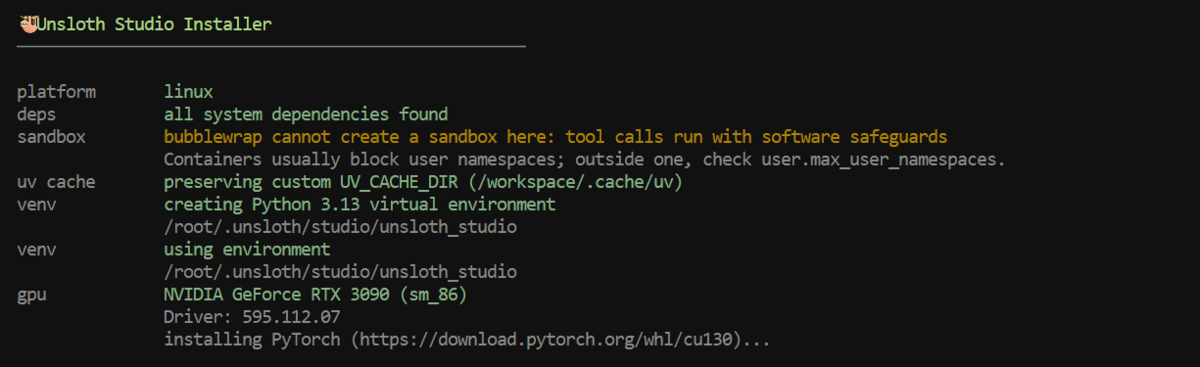
During installation, you might be asked whether you want to start Unsloth Studio immediately. For now, select n, as we need to configure a few things first.
Start Unsloth Studio now? [Y/n] nNext, restart your terminal shell so that the newly installed commands are available.
exec bashNow, let’s configure where our downloaded models and cache files will be stored. AI models can take up quite a lot of space, so it is better to keep everything in one location.
For this tutorial, we will store them in a folder inside our home directory.
export HF_HOME="$HOME/models/huggingface"
export HUGGINGFACE_HUB_CACHE="$HF_HOME/hub"
export XDG_CACHE_HOME="$HOME/.cache"
You can change these paths depending on where you have free storage. Just make sure you have enough space for the model you plan to download.
Finally, start Unsloth Studio using the following command:
unsloth studio -H 127.0.0.1 -p 8080This will start the server on port 8080. On the first launch, you may be asked to create a password to access the interface.

Once the server is running, open your browser and visit:
http://localhost:8080You should now see the Unsloth Studio interface, where you can download models, chat with them, and adjust different settings.
That’s it. We have successfully installed Unsloth Studio. Next, we will download and load Inkling 2 Mini using a 4-bit quantized version that can fit on our RTX 3090.
2. Load and Test Inkling 2 Mini
Once Unsloth Studio is running, open the web interface and log in using the password you created earlier.
You will see a simple interface where you can chat with models, enable tools, and adjust different settings.
To get started, click on the model selection menu and search for Inkling 2 Mini. Select the model, and Unsloth Studio will automatically download and load it for you.
For this tutorial, we are using unsloth/Inkling-2-Mini-GGUF with the UD-Q4_K_XL quantization, which works well with our RTX 3090.
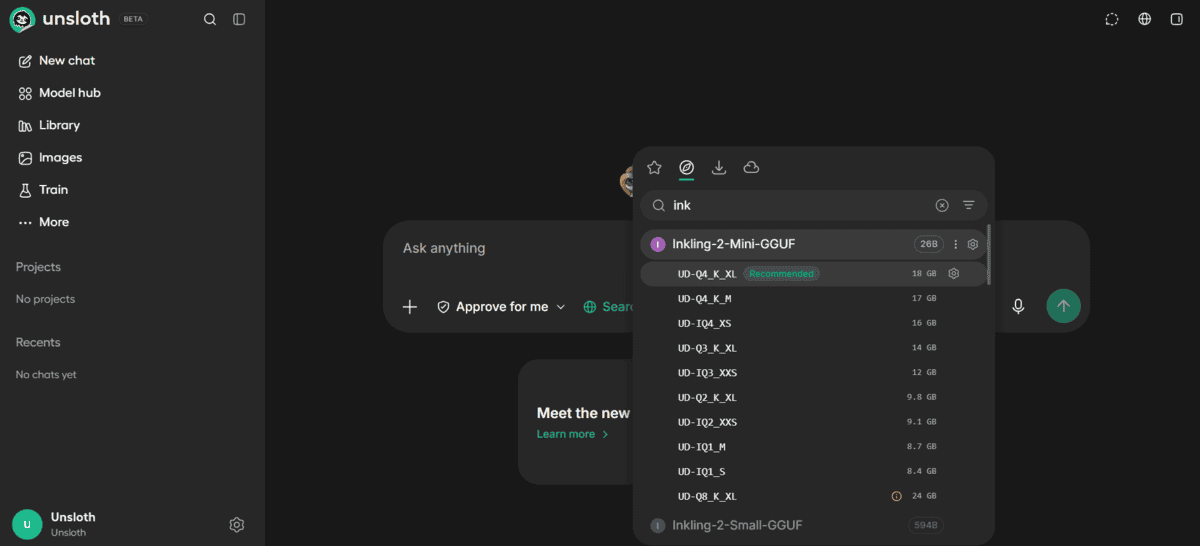
The download might take a few minutes, depending on your internet connection. Once it’s done, the model will be loaded automatically, and you can start chatting with it right away.
For our first test, we enabled web search and asked the model whether we should buy NVIDIA stock.
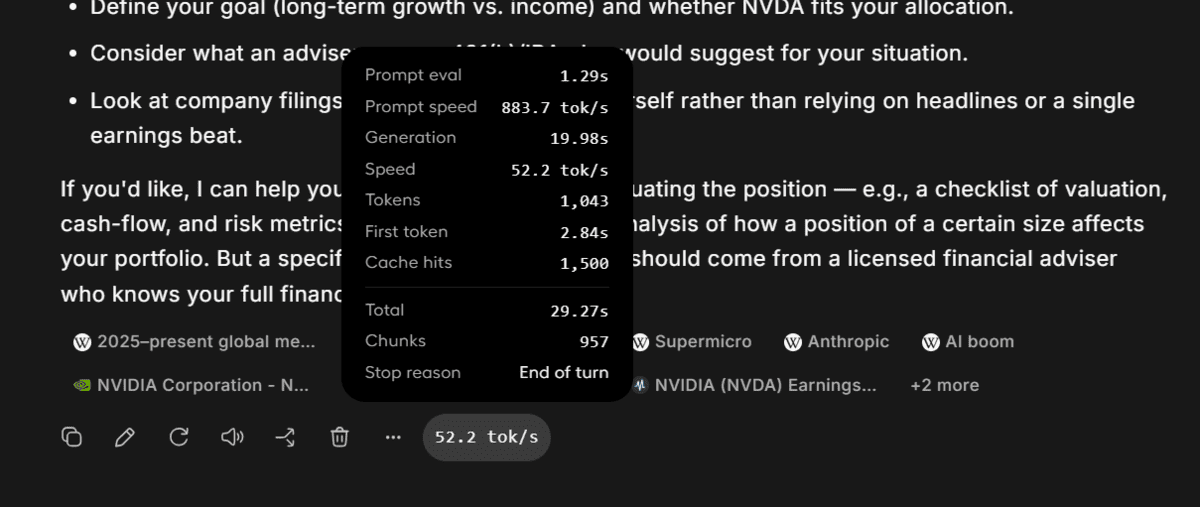
The model searched the web, gathered information from different sources, and gave us a detailed answer pretty quickly. It was interesting to see a local model handle a research-heavy question so well.
We were also getting around 52 tokens per second on average, which is quite impressive for a model running on a single RTX 3090.
Next, we wanted to try something more interesting. We asked the model to build an oil market dashboard that tracks different oil prices and indices.
For this test, we disabled the tools because we wanted the model to generate the website directly without relying on Python or other tools.
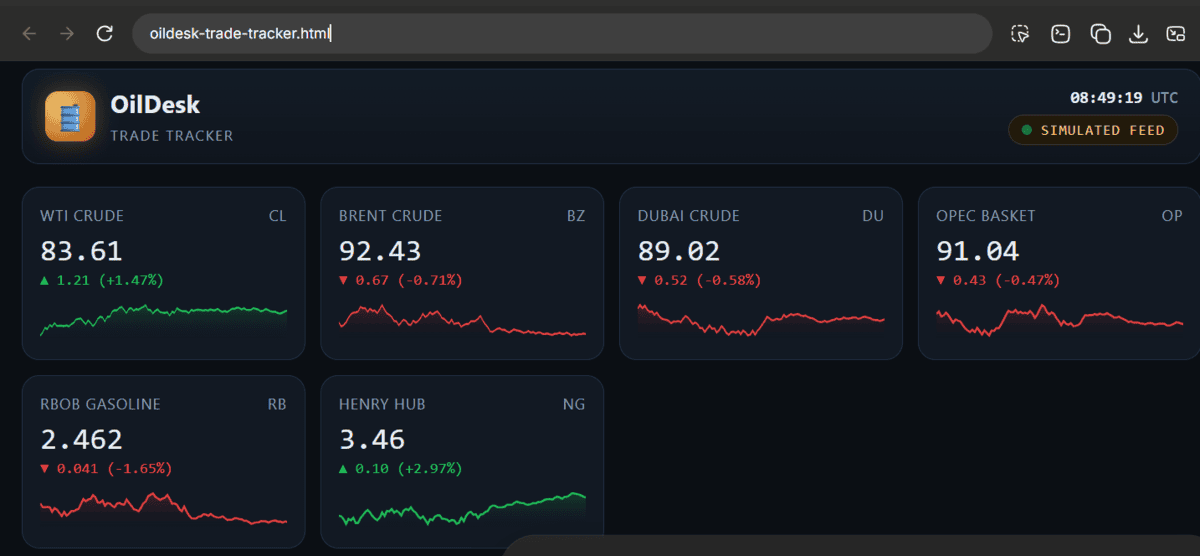
The result was surprisingly good. It created a clean dashboard with different oil price indicators, charts, and other useful information.
What impressed me most was that the dashboard looked and behaved like a live market dashboard. It simulated price movements and updated the numbers even though the actual markets were closed.
Of course, these were simulated values rather than real-time market data, but the overall design and functionality were really good.
3. Connect Inkling 2 Mini to the Pi Coding Agent
Now that we have tested the model in Unsloth Studio, let’s take things a little further and use it with a coding agent.
For this, we will use Pi, a lightweight terminal-based coding assistant that can help us build applications, write code, and work on projects directly from the terminal.
First, install Pi using the following command:
curl -fsSL https://pi.dev/install.sh | shOnce the installation is complete, restart your terminal shell:
exec bash -lNext, go back to Unsloth Studio and open the API settings. You will find the connection details and API key needed to connect your local model to Pi.
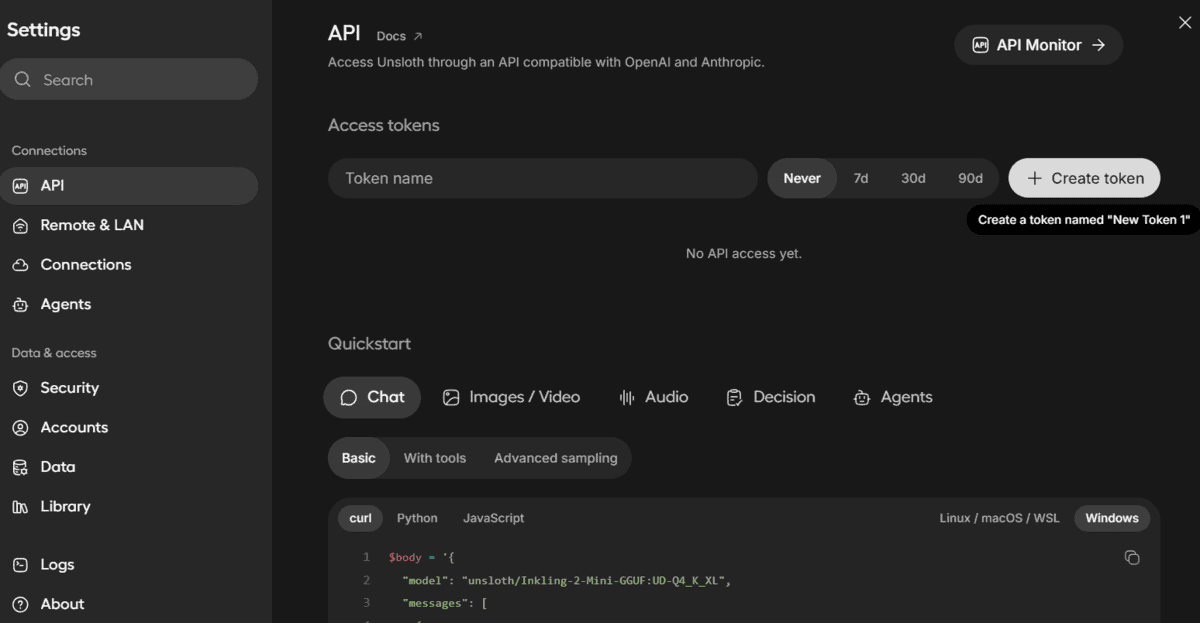
Unsloth also provides a command that makes this process quite simple. Copy the command from your setup and run it in the terminal.
For Linux, it should look something like this:
export UNSLOTH_STUDIO_URL="http://0.0.0.0:8080"

unsloth start pi --api-key YOUR_API_KEY --model unsloth/Inkling-2-Mini-GGUF:UD-Q4_K_XL
Make sure to replace YOUR_API_KEY with your own API key. If Unsloth Studio is running on another machine, use that machine’s accessible server address instead.
That’s it. We can now use Inkling 2 Mini directly from our terminal through the Pi coding agent.
To see how well it performs, I decided to give it a more challenging task. I asked it to build a 2D endless-runner game inspired by Subway Surfers, with animations, obstacles, collectible coins, and other visual effects.
Here is the prompt I used:
Create a fully playable, visually stunning 2D Subway Surfers-style endless runner game using HTML5 Canvas, CSS, and JavaScript, featuring three-lane movement, jumping, sliding, trains, obstacles, collectible coins, power-ups, smooth character animations, parallax scrolling city backgrounds, colorful cartoon graphics, particle explosions, glowing effects, motion blur, speed trails, dynamic lighting, screen shake, realistic shadows, sound effects, background music, increasing difficulty, collision detection, score tracking, responsive keyboard and mobile swipe controls, animated menus, pause and restart functionality, and polished arcade-style gameplay optimized for 60 FPS, using original characters and assets.
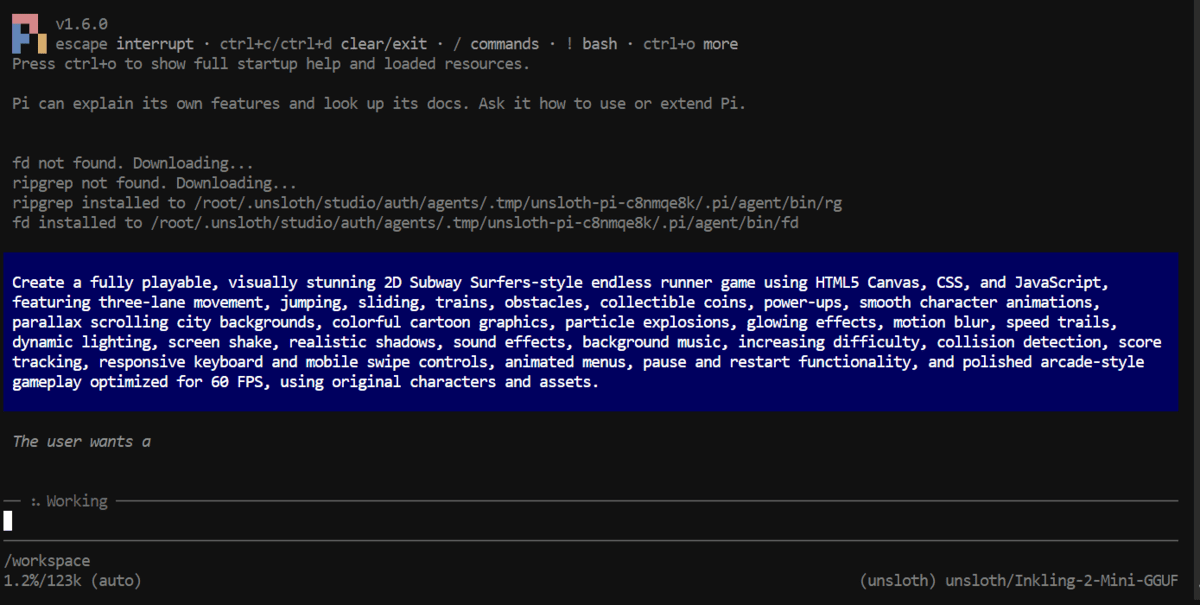
The model started generating the code, and within a few minutes, we had a playable game that we could open directly in our browser.

The result was actually pretty impressive. Compared to the basic 2D game we created earlier, this version looked much better. It had a colorful environment, a polished start screen, and several visual effects that made it feel more like a proper game.

As you can see in the screenshot above, the model did a really good job with the overall design.
Of course, there were still a few issues. For example, the character was running from left to right instead of moving forward, which wasn’t exactly what we wanted. But these are things we can easily fix by giving the coding agent a few more prompts.
What impressed me most was how quickly we could go from a simple idea to an actual working game.
In around 10 minutes, we managed to create a playable browser game using a local AI model running on a single RTX 3090.
And since the game is built using HTML, CSS, and JavaScript, we can easily deploy it on Vercel and share it with others so they can play it directly in their browsers.
This is where using a local model with a coding agent becomes really interesting. Instead of just generating code in a chat window, we can actually build, test, and improve complete applications without relying on a paid AI API.
My Thoughts on Inkling 2 Mini
What I really like about Inkling 2 Mini is how quickly the open-source community has started experimenting with it.
I have been seeing posts on Reddit and X where people are getting close to 300 tokens per second, and sometimes even more, by using custom builds of llama.cpp, different inference engines, and optimizations specifically designed for their hardware. Of course, these results depend on the GPU, quantization, and setup, but it is still impressive to see how much performance people can squeeze out of this model.
And it is not just about speed. People are also experimenting with coding agents, the DeepSeek harness, custom skills, and different tools to improve the model’s coding performance. Some are even building their own inference engines to get better results.
This is what I really like about local AI models. You are not limited to what the model provides out of the box. You can experiment with different settings, add tools, create custom skills, and build an entire system around the model that works for your specific application or codebase.
The model itself is just one part of the equation. The tools, coding agent, inference engine, and overall setup can make a huge difference in what you can achieve with it.
And this is what makes open-weight models so exciting. Every time a new model comes out, we start seeing new open-source projects, optimizations, and tools that push it even further.
Over time, these improvements can help smaller local models compete with much larger proprietary models on specific tasks. And the best part is that you have more control over how everything works.
Abid Ali Awan (@1abidaliawan) is a certified data scientist professional who loves building machine learning models. Currently, he is focusing on content creation and writing technical blogs on machine learning and data science technologies. Abid holds a Master’s degree in technology management and a bachelor’s degree in telecommunication engineering. His vision is to build an AI product using a graph neural network for students struggling with mental illness.
Soyez le premier à commenter